Financio uses AI to help you manage your finances more efficiently. You have full control over whether AI features are enabled for your account.
Accessing AI & Privacy Settings
-
Click the settings (gear) icon in the top right corner.
-
In the Settings sidebar, click AI & Privacy.
-
On the Home tab, tap the gear icon in the top left to open Settings.
-
Under Preferences, tap AI & Privacy.
Enabling or Disabling AI Features
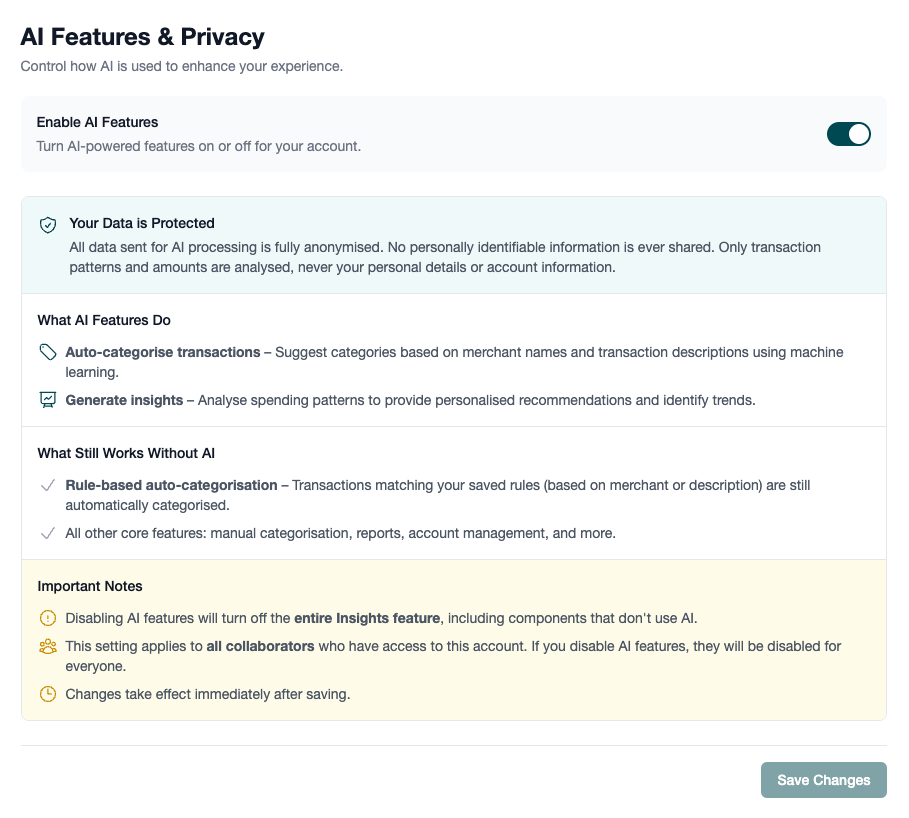
Use the Enable AI Features toggle to turn AI-powered features on or off. Click Save Changes to apply your preference.
Only the household Owner can change this setting. For everyone else the toggle is greyed out and no Save button appears; ask the owner to change it for you.
What AI Features Do
When AI is enabled, Financio uses machine learning to:
- Auto-categorise transactions - Suggests categories based on merchant names and transaction descriptions
- Generate insights - Analyses spending patterns to provide personalised recommendations and identify trends
How Your Data is Protected
Most insight questions are answered on Financio's own servers without involving an AI provider at all. When an AI provider is used, we send only amounts, dates, and category or merchant names: never your name, email, account numbers, or account names. Auto-categorisation sends the merchant and description of the transaction being categorised, and nothing that identifies you.
On-Device AI on iPhone
Reading a PDF statement or screenshots on iPhone works differently to the features above. It uses Apple Intelligence on the device itself, so the document is never uploaded: not to Financio's servers, and not to any AI provider. Nothing is stored afterwards either; only the transactions you choose to import are saved.
Because no data leaves your iPhone, this isn't covered by the Enable AI Features toggle, which governs the server-side features above. If you've turned AI features off, you can still import from a PDF or screenshots, and the transactions simply arrive without category suggestions.
See Importing from PDFs and Screenshots for how it works.
What Works Without AI
If you disable AI features, the following still work normally:
- Rule-based auto-categorisation - Transactions matching your saved rules are still automatically categorised
- All core features - Manual categorisation, reports, account management, and everything else
Important Notes
Disabling AI features will turn off the entire Insights feature, including components that don't use AI. This setting applies to all collaborators who have access to your account.
Frequently Asked Questions
Will I lose my data if I disable AI?
No. Disabling AI only affects future AI-powered suggestions and insights. All your existing data, categories, and rules remain intact.
Can I enable AI again later?
Yes. You can toggle AI features on or off at any time. Changes take effect immediately after saving.