Financio uses AI to help you manage your finances more efficiently. You have full control over whether AI features are enabled for your account.
Accessing AI & Privacy Settings
-
Click your profile icon in the top right corner and select Settings.
-
In the Settings sidebar, click AI & Privacy.
Enabling or Disabling AI Features
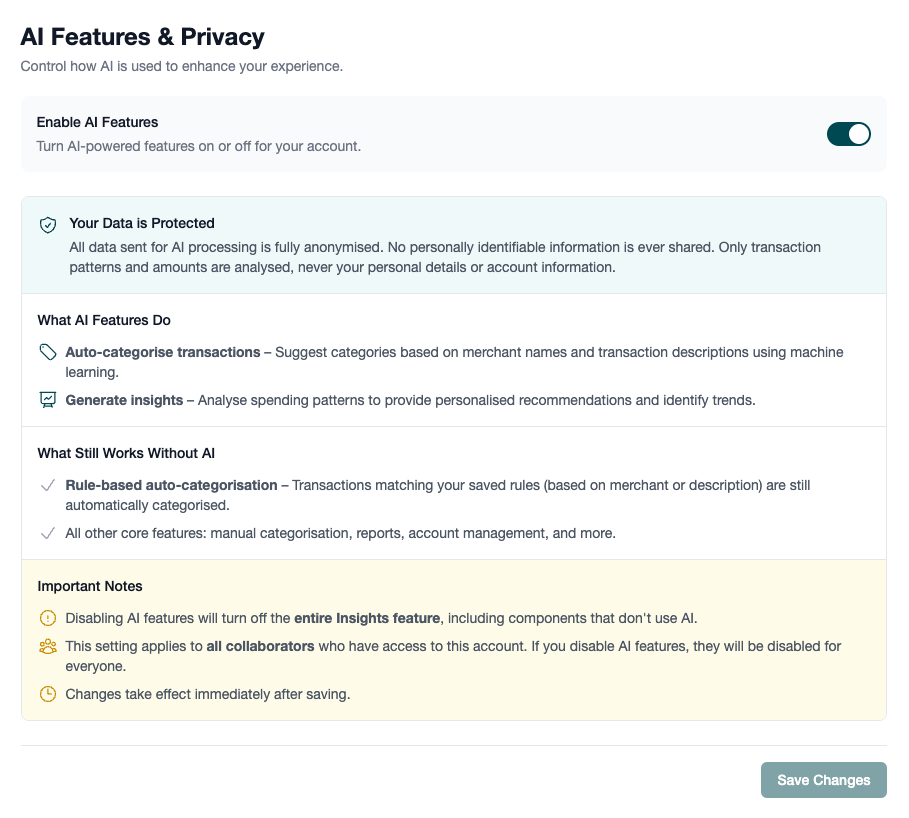
Use the Enable AI Features toggle to turn AI-powered features on or off. Click Save Changes to apply your preference.
What AI Features Do
When AI is enabled, Financio uses machine learning to:
- Auto-categorise transactions - Suggests categories based on merchant names and transaction descriptions
- Generate insights - Analyses spending patterns to provide personalised recommendations and identify trends
How Your Data is Protected
All data sent for AI processing is fully anonymised. Financio never shares personally identifiable information with AI systems. Only transaction patterns and amounts are analysed - never your personal details or account information.
What Works Without AI
If you disable AI features, the following still work normally:
- Rule-based auto-categorisation - Transactions matching your saved rules are still automatically categorised
- All core features - Manual categorisation, reports, account management, and everything else
Important Notes
Disabling AI features will turn off the entire Insights feature, including components that don't use AI. This setting applies to all collaborators who have access to your account.
Frequently Asked Questions
Will I lose my data if I disable AI?
No. Disabling AI only affects future AI-powered suggestions and insights. All your existing data, categories, and rules remain intact.
Can I enable AI again later?
Yes. You can toggle AI features on or off at any time. Changes take effect immediately after saving.