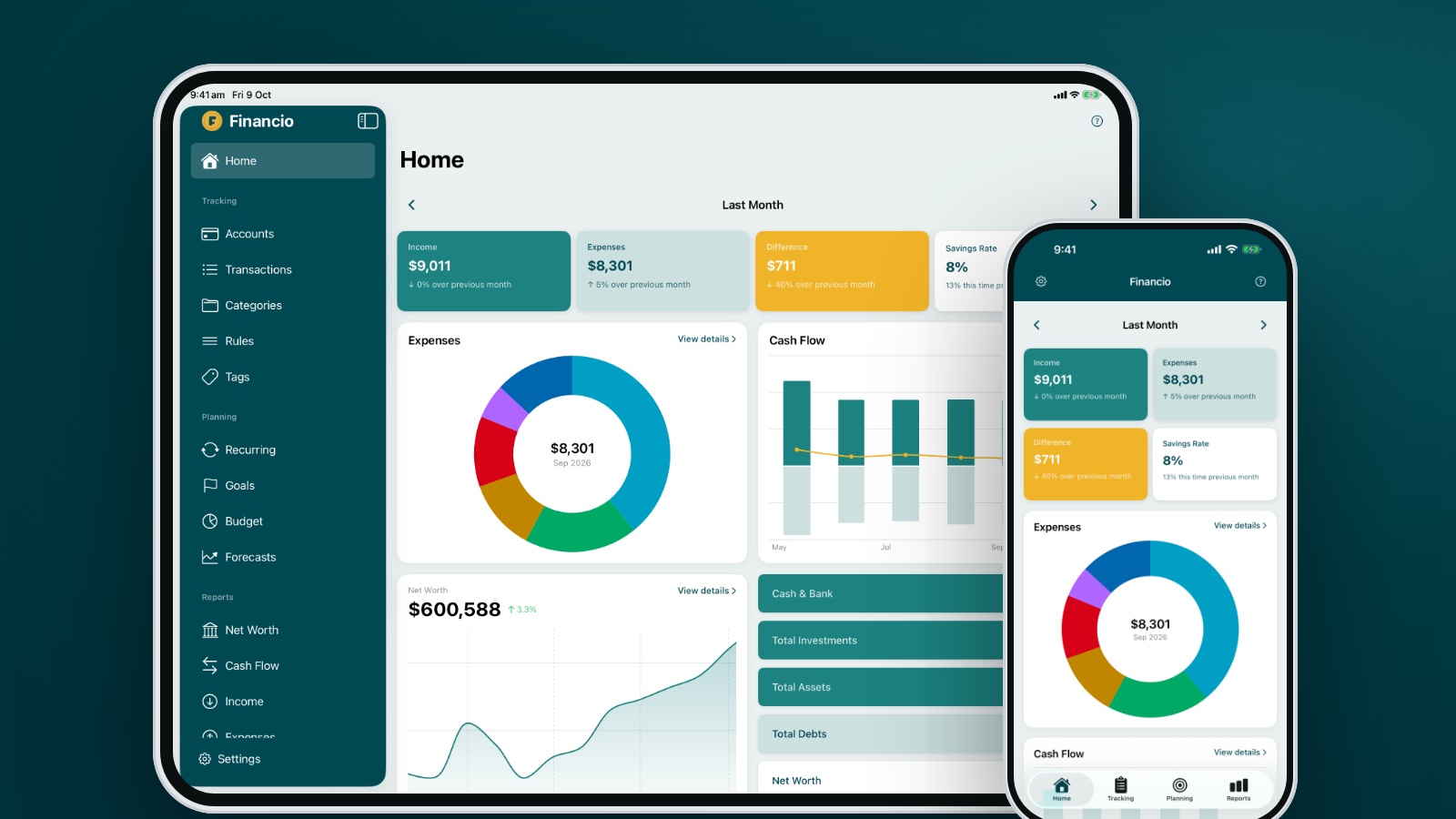
When Financio for iPhone arrived on the App Store in August, one of the most common questions was some version of "what about my iPad?" Today's update answers it. Financio 2.0 runs natively on iPad, with a layout designed for the bigger screen rather than a phone app blown up to fit.
Why iPad deserved its own layout
A budgeting app on a phone is about quick checks: what did I spend, how is this month tracking, did that payment come through. On a tablet you tend to sit with your money for a while. You compare months, look over a report, tidy up categories, plan the budget for next month. That kind of work needs space, so we gave iPad a layout of its own instead of stretching the phone screens.
What it looks like
A sidebar, like the web app. Every part of Financio sits in a teal sidebar on the left: Home, your accounts and transactions, planning tools and reports. If you use Financio in a browser, it will feel familiar straight away. When you want the full width for a chart or a long list, hide the sidebar and bring it back with a tap.
A dashboard that uses the room. Home puts income, expenses, the difference and your savings rate across the top, with the expenses donut, cash flow and net worth side by side underneath. Swipe between months and the summary, expenses and cash flow move together.
Transactions as a table. On iPad your transactions show in columns, with merchant, account, category and amount lined up the way they are on the web. Searching, filtering and editing several transactions at once all work as they do on iPhone.
Planning and reports with space to breathe. Goal cards sit two across. Budgets show every category without squeezing. Net worth, cash flow, income and expense reports get wide charts in both landscape and portrait.
Settings in two columns. Choose a setting on the left and change it on the right, without jumping back and forth.
If you use your iPad in Split View or Slide Over, Financio switches to the iPhone layout so nothing gets cramped.
One app, every device
There is nothing new to buy or set up. Financio for iPad is the same App Store app as Financio for iPhone, and it uses the same account and the same data as the web app. Add a transaction on your phone at the shops, and it is waiting on your iPad when you sit down to do the budget. Your subscription covers every device you sign in on.
Also in version 2.0
The iPad work came with improvements everywhere else:
- Investments. Selling holdings is simpler, and you can now track the cash held inside an investment account
- Importing. Statements are read more reliably, so more of your transactions come through cleanly
- Recurring. A tidier list that is easier to scan, with overdue items highlighted
- Net Worth. Summary rows no longer squash the figures on smaller phones, and including or excluding an account now updates Home straight away
- Error screens. When something can't load, Financio now says so clearly and gives you a quick way to try again
How to get it
- Download Financio from the App Store on your iPad. It requires iPadOS 26 or later
- Sign in with your existing Financio account, or create one in the app
If you already have Financio on your iPhone, update it to version 2.0 to pick up the fixes above.
Tell us what you think
The iPad layout is brand new, and we would love to hear how it fits the way you work. If something looks off, or a screen could use the space better, use the feedback option in the app or reach out through the help pages. Every message gets read.